

After two days of testing, it’s safe to say that Apple’s new Connectivity Assist feature in iOS 27 is bad news for your cellular data plan.
Is Your 4G and 5G Data Draining Fast After Installing iOS 27 and iPadOS 27? Blame Connectivity Assist
Connectivity Assist is a feature that replaces Wi-Fi Assist on both iPhone and iPad. It’s a key part of iOS 27 and iPadOS 27, both. The main function of this feature is ensure uninterrupted data by intelligently switching between the active Wi-Fi and cellular networks.
According to Apple:
Your iPhone more seamlessly chooses the best available Wi‑Fi or cellular connection, so whether you’re getting directions as you leave home or taking a FaceTime call as you step off a plane, you’ll stay connected.
Unlike Wi-Fi Assist, you won’t see the transition from Wi-Fi to cellular and vice versa at all. It’s seamless, fast, and works so well in the background that it becomes a problem for a lot of people, including myself.
Ever since I installed iOS 27 and iPadOS 27, I noticed that my cellular data bucket was draining very fast. At first, I blamed myself for it, because I do use my iPhone and iPad a lot when I’m outside and away from Wi-Fi. However, data was being used even when I was connected to Wi-Fi most of the day.
I went to Settings > Wi-Fi > Connectivity Assist, and noticed that the feature had used about 4GB of data in the background. In order to make sure nothing was wrong, and it wasn’t some software bug, I reset the counter.
After two days, more than 800 megabytes of data were gone. Just two days, as you can see from the screenshot below.
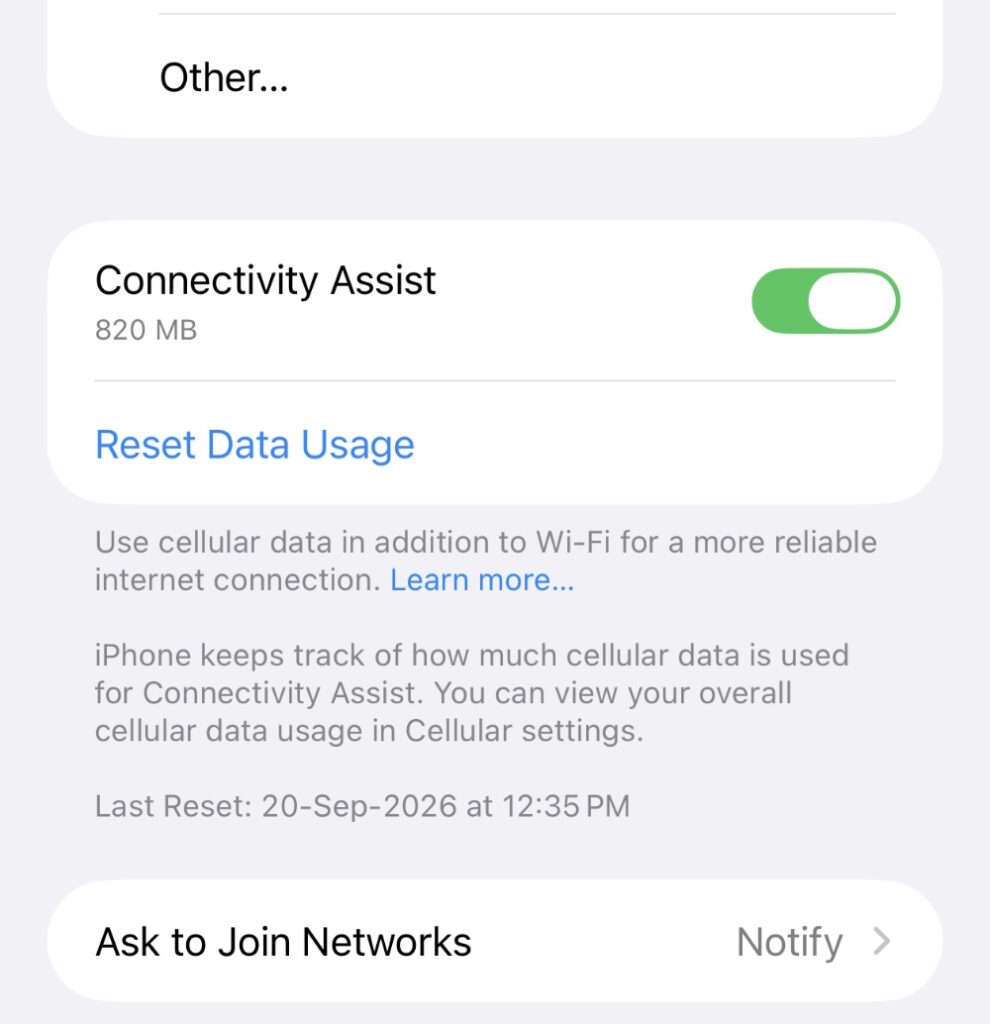
The strange thing is, there’s nothing wrong with my home Wi-Fi at all. I’ve been using Wi-Fi Assist since forever, and it had only used a couple of hundred megabytes of data in the background if Wi-Fi was causing issues or connectivity was poor. This amount of data was used in under a year.
But Connectivity Assist is eating away data like there’s no Wi-Fi connection at all.
I will highly recommend turning this feature off if you have a limited data plan like I do. I’m not sure if this is a bug, but this much data being used while connected to Wi-Fi is certainly not normal behavior.
It would be great if readers can share their experience with Connectivity Assist too after installing iOS 27 and iPadOS 27.