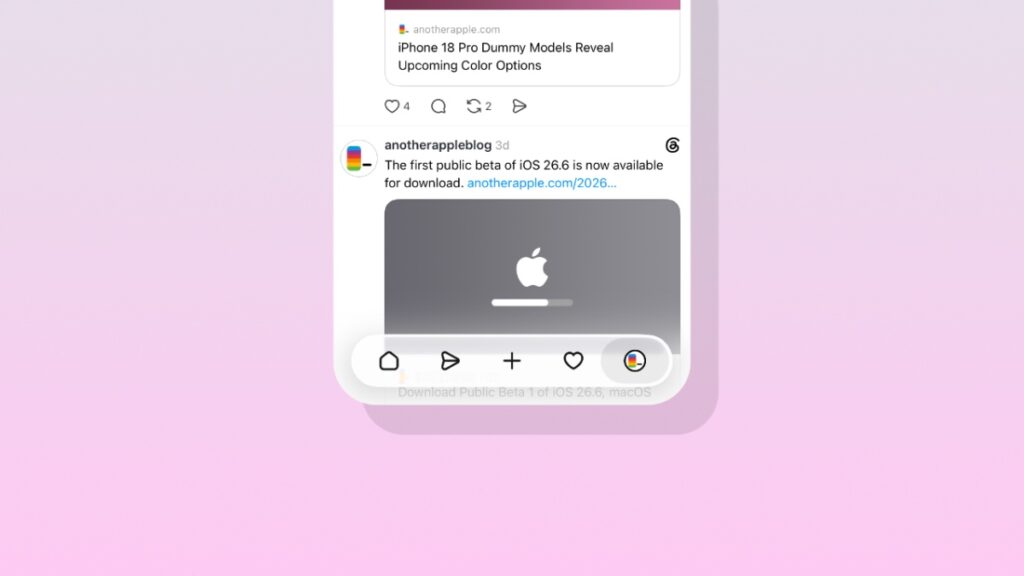

Waiting for the Liquid Glass UI in the Threads app for iPhone? It’s rolling out, and here’s how you can check if it’s already available.
Liquid Glass is Rolling Out for the Official Threads App on iPhone, Enable it by Force Closing the App
Meta hasn’t been quick when it comes to rolling out Liquid Glass for their apps. But slowly and gradually, it’s getting there, with Threads getting the update as we speak.
First and foremost, you must update to the latest version of the Threads app on your iPhone. You can head over to this link and then tap on the Update button, if you haven’t already.
Once the update is complete, you may not see the Liquid Glass UI just yet. All you have to do is force close the app from the app switcher and launch it again.
Just swipe up and hold from the bottom of your iPhone display to reveal your background apps, find Threads, and then swipe up on it to close.
If you’re one of the lucky few, you’ll immediately see the Liquid Glass UI. And surprisingly, it’s well implemented too. Seems as though Meta cooked for a while before shipping this.
While Liquid Glass is good and all, but it’s the iPad app I’m actually patiently for. Threads makes more sense on a larger display, and it absolutely shines on the desktop. On iPad, it will be a great experience too, thanks to the Retina display.
We eventually got WhatsApp for iPad, I’m hopeful Threads for iPad will be here eventually.