
Instagram has released its Edits app for the Mac, and you can download it right now, absolutely free.
Instagram Brings its Edits App to the Mac, Export Your Projects in 4K and Use it However You Like
There are multiple ways you can edit videos on your iPhone, with the Edits app being the best option because it’s straight from Instagram itself, and it makes publishing to the platform easy too.
However, editing big projects on an iPhone can be a bit of a hassle, that’s why Instagram is bringing the Edits app to the Mac.
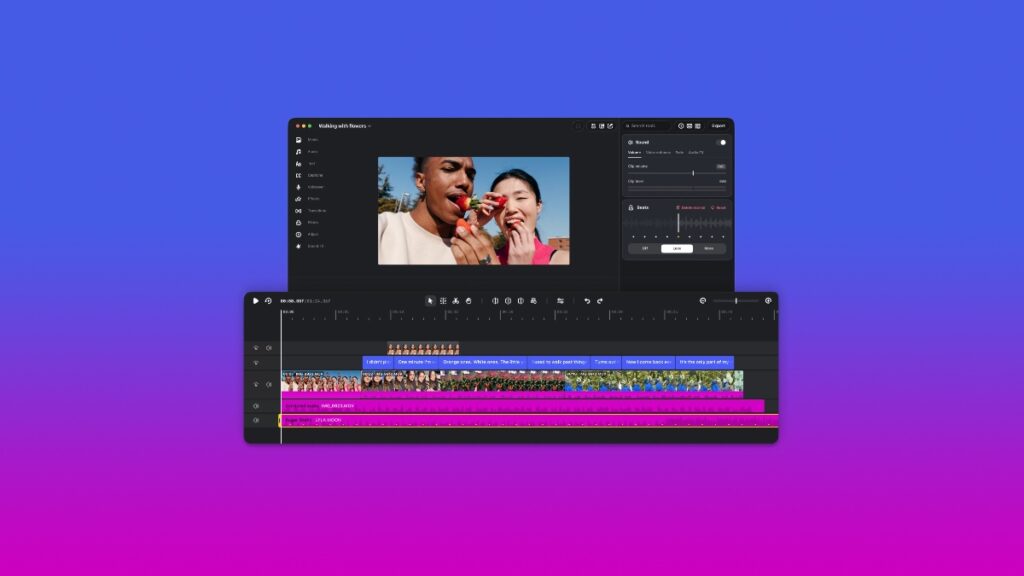
The app allows precise editing of your timeline, including support for multiple video and audio tracks. You can color grade your project directly from Edits, and even have the option to import your own LUTs for that cinematic or situation-specific look.
You can export video directly to Instagram using the app, or you can export it as a 4K file on your Mac in multiple aspect ratios. Basically, you’re not tied to using Instagram only here; you can create an entire project, export it to your Mac, and publish it wherever you like.
However, do keep in mind that you need an Instagram account in order to start using the app. It’s just one sign-in, and then you can start exporting your projects locally or directly on the platform.
Given Edits is free, and an app like Final Cut Pro requires a monthly or yearly subscription, Instagram really wants to position the app as your primary option for creating and editing video projects.
If you’re interested in taking Edits for a spin, you can download it from this link.