
Anyone can use your publicly available photos or videos to create AI content on Instagram, but thankfully you can disable this feature.
Stop AI from Using Your Instagram Photos and Videos to Generate Content – Works with Public Profiles Only
Instagram rolled out a feature where you can just tag an Instagram username in Meta AI to generate content based on their likeness. The strange part is, you have to opt out of this feature, because by default, everyone’s opted in.
Before you panic, do keep in mind that this ‘feature’ works on profiles that are public, which means Instagram can’t access your private feed of photos and videos to generate content based on what you’ve posted.
In order to disable this madness completely right from your iPhone, follow the steps outlined below right away:
Step 1. Launch the Instagram app on your iPhone.
Step 2. Tap on your profile tab at the bottom right corner.
Step 3. Tap on the three lines at the top right to access settings.
Step 4. Scroll down, find ‘Sharing and reuse,’ and then tap to open it.
Step 5. You’ll see two toggle switches – Posts and Reels. Disable them, as shown in the screenshot below.
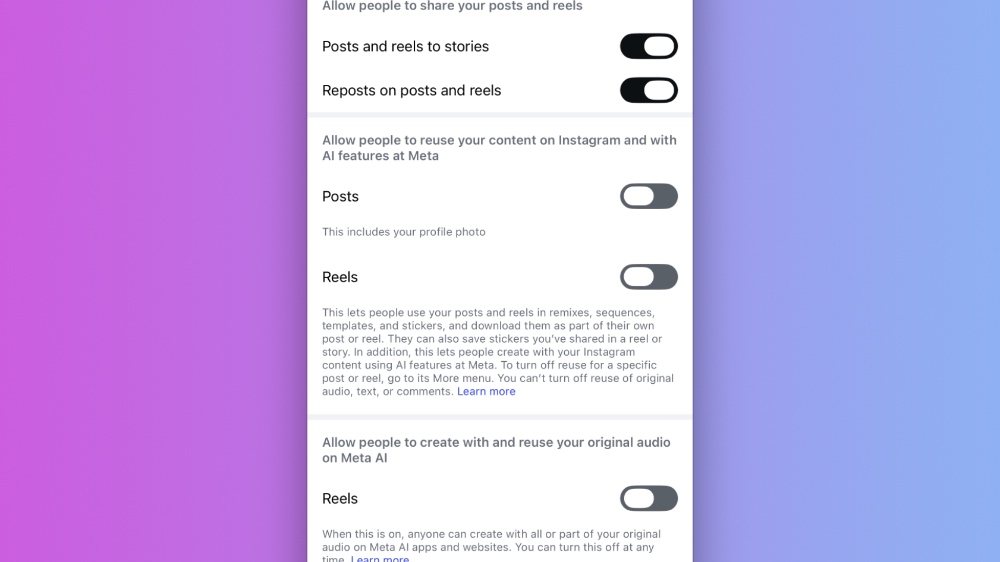
Once you do this, your content won’t be used to generate anything new using AI. But given how things work in the world of AI, I wouldn’t be surprised if brute force is used to access your data to generate AI content anyway. But hey, there’s a toggle switch right now, so make use of it before the situation slightly worsens.