
macOS 26.1 Tahoe RC is now available for download on the Mac with build number 25B77, and anyone can install it right away.
Download macOS 26.1 Tahoe RC Today with the New Apple TV Icon and Tinted Option for Liquid Glass
According to Apple, these are the official release notes for macOS 26.1 Tahoe:
This update adds a new tinted option for Liquid Glass along with other features, bug fixes, and security updates for your Mac.
For information on the security content of Apple software updates, please visit: https://support.apple.com/100100
So yeah, the major change in this update is the fact that you can tone down Liquid Glass a little and go for the new ‘tinted‘ option – not sure why you’d want to do that. But the one thing the release notes do not mention is the new icon for the Apple TV app which is in line with the recent rebranding.
If you’ve been testing out macOS 26.1 Tahoe all this time as a developer or a public beta tester, then go to System Settings > General > Software Update right now, and then click on Update Now. The new RC build will start to download immediately.
Like I said, anyone can download and install the new macOS 26.1 RC update, and all it takes is signing up for the public beta, because that’s the easiest-possible route you can take.
Just launch Safari, and then go to beta.apple.com, and then sign up using the Apple Account you are currently using on your Mac. Once done, launch System Settings, go to General > Software Update > Beta Updates, and then select macOS Tahoe 26 Public Beta, and then click on Done.
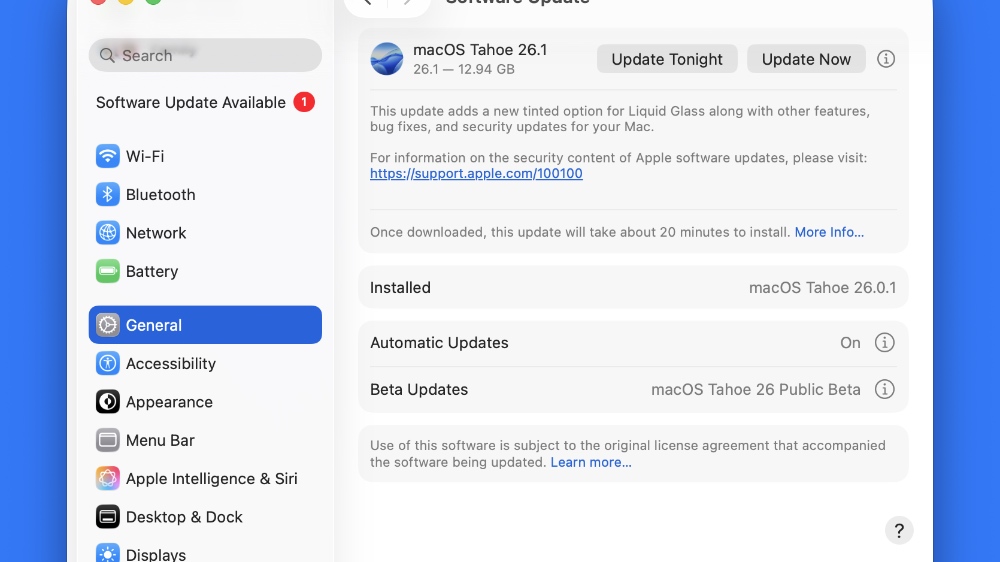
The new RC update will show up instantly, and you can just click on Update Now to start the download.
The same update will likely be released to everyone next week. If there are issues found, Apple might release macOS 26.1 Tahoe with a different build number.