


You can use the Find My network to remotely check how much battery life your iPhone, iPad or MacBook currently has.
Remotely Find Out How Much Battery Your iPhone, iPad or MacBook has
Checking the battery life of an Apple device is easy. Just look at the battery indicator at the top right, and you’re good to go.
However, what if the device is not with you? You forgot it at home or at a friend’s place. And you want to know how much battery is remaining so you can plan the rest of the day accordingly.
This is where Find My comes in for the rescue, once again.
Here’s how you can remotely find out how much battery life is remaining on one of your devices:
Step 1. Launch the Find My app on your iPhone, iPad or Mac.
Step 2. Open the Devices tab.
Step 3. You’ll see all your devices that are currently signed in or associated with your Apple Account. Find your iPhone, iPad or MacBook in the list and tap/click on it to open.
Step 4. If you’re using an iPhone or iPad, you’ll immediately see the battery life under the device’s name. If you’re on a Mac, click on the (i) button and you’ll see the battery life at the top.
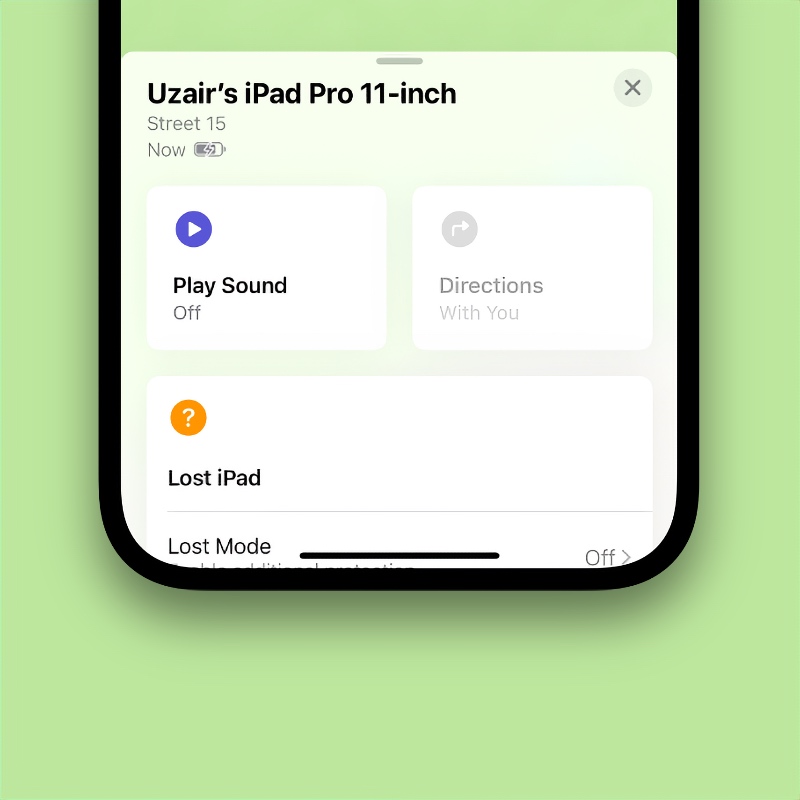
Sure, it’s just the battery indicator and not the percentage, but it’s enough to give you an idea about the current battery situation.
Another cool thing is how Find My will actually tell you if your device is plugged into a power outlet or not. You’ll see a tiny lightning bolt over the battery indicator if it’s plugged into power. Check out the screenshot above as an example.




