
Tired of swiping manually while watching Reels on Instagram? Here’s how you can enable auto-scroll on iPhone in a few taps.
Let Instagram Do the Work for You and Scroll Reels on iPhone Automatically Without Lifting a Finger
Just like TikTok, you can now enable the new auto-scroll feature on Instagram, allowing you to jump to the next Reel without having to swipe on your iPhone screen.
The feature is pretty straightforward – once a Reel is done playing, it will move on to the next one, and then the next one. You get the point.
It’s the ultimate convenience in the world of pre-sleep rituals.
Enabling this feature is actually quite simple too. Just pick up your iPhone and do exactly what I’ve written below:
Step 1. Launch the Instagram app.
Step 2. Either go to the Reels tab or open any Reel manually from an account.
Step 3. Tap on the ‘three dots’ button on the bottom right.
Step 4. Now enable the ‘Auto scroll’ toggle switch. The change will take effect immediately.
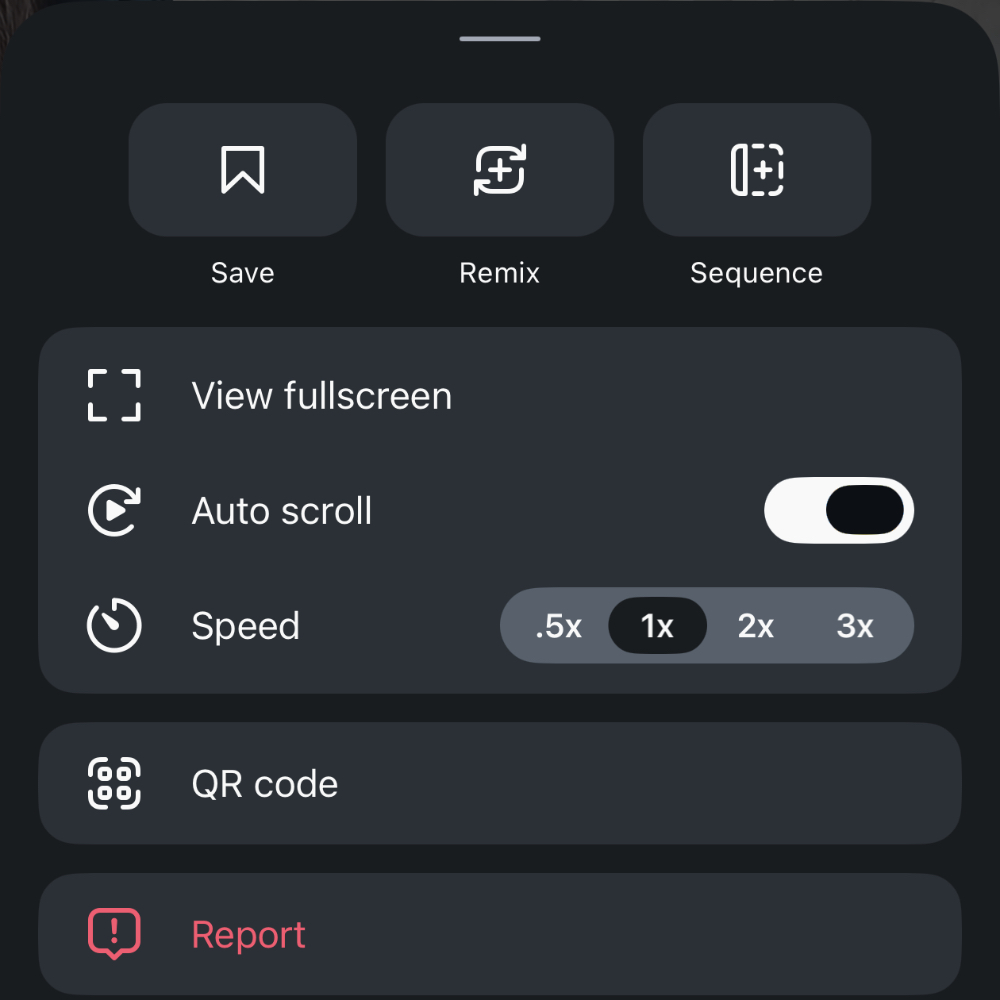
There’s really nothing you have to do beyond this. Once a reel is done playing, it will go onto the next one.
If you’ve been searching for the ultimate doomscrolling feature, it may not get better than this. But if I’m wrong, you’ll see me again soon.