


Here’s how you can disable the Lock Screen swipe gesture on your iPhone and iPad to quickly access the Camera app.
Apple Now Allows You to Disable the Swipe Gesture / Shortcut for Launching the Camera App from the Lock Screen on iPhone and iPad
Apple gives you multiple ways to launch the Camera app on your iPhone and iPad.
Speaking of iPhone alone, you can either press Camera Control, map the Action button to launch the camera, or swipe left on the Lock Screen.
The swipe left on the Lock Screen is probably the most loved and despised shortcut to launch the Camera app on both iPhone and iPad. While it is convenient, you accidentally trigger it every now and then without realizing it, leaving you with an active camera in your pocket that leads to unintended battery drain.
With iOS 26.1 and iPadOS 26.1, Apple is allowing users to disable this gesture / shortcut completely. And I’m going to show you what you have to do in order to disable it on your iPhone and iPad as well.
Step 1. Launch the Settings app.
Step 2. Find Camera and open it.
Step 3. At the bottom you’ll see a new option called ‘Lock Screen Swipe to Open Camera.’ Simply disable it.
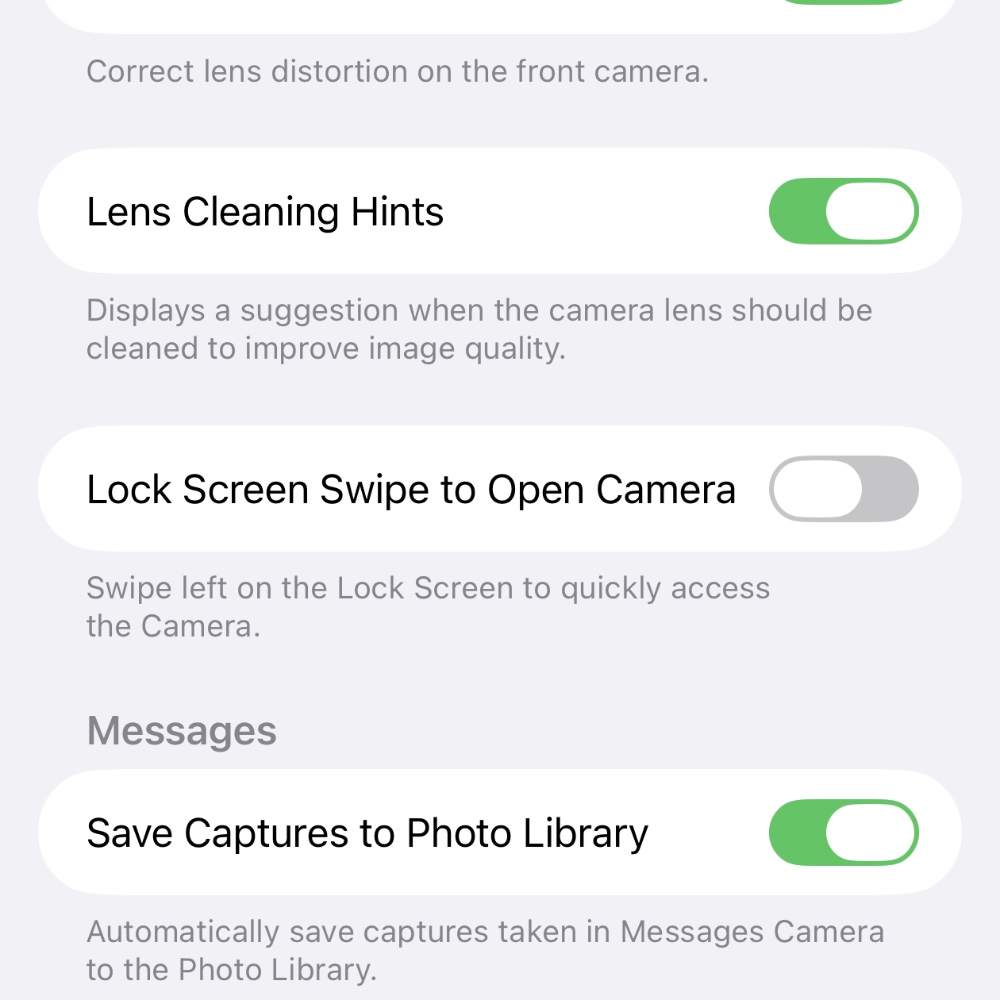
Once the toggle switch is off, simply lock your iPhone or iPad, turn on the display, and try swiping left. Noticed how nothing happened? Now you can move on with life knowing the Camera app will never launch on its own, even by accident.




