


If you’re experiencing Wi-Fi, Bluetooth, or even 5G cellular issues after installing iOS 26 or iPadOS 26, here’s what you have to do.
iOS 26 and iPadOS 26 May Introduce Wi-Fi, Bluetooth and Cellular Issues on iPhone and iPad, Here’s the Fix
Installing a major operating system like iOS 26 or iPadOS 26 can be an overwhelming experience. While things will start to look brand-new, at the same time, you might run into issues as well.
Wi-Fi, Bluetooth, and cellular issues are very common when you go from one operating system to the other, and iOS 26 or iPadOS 26 aren’t going to be any different.
Thankfully, a quick reset of network settings will immediately bring things back on track. The only downside is that you have to reconnect to certain things and might need cellular settings if your carrier demands it.
What You Have to Do
Before you follow any of the steps below, sometimes a quick restart can fix things too. Just go to Settings > General > Shut Down, then slide to power down. Turn on your device and see if the issue persists.
Still does? Then follow these steps:
Step 1. Launch the Settings app.
Step 2. Open General.
Step 3. Scroll down and tap on Transfer or Reset iPhone/iPad.
Step 4. Tap on Reset at the bottom.
Step 5. Select Reset Network Settings. Confirm your selection and let your device restart.
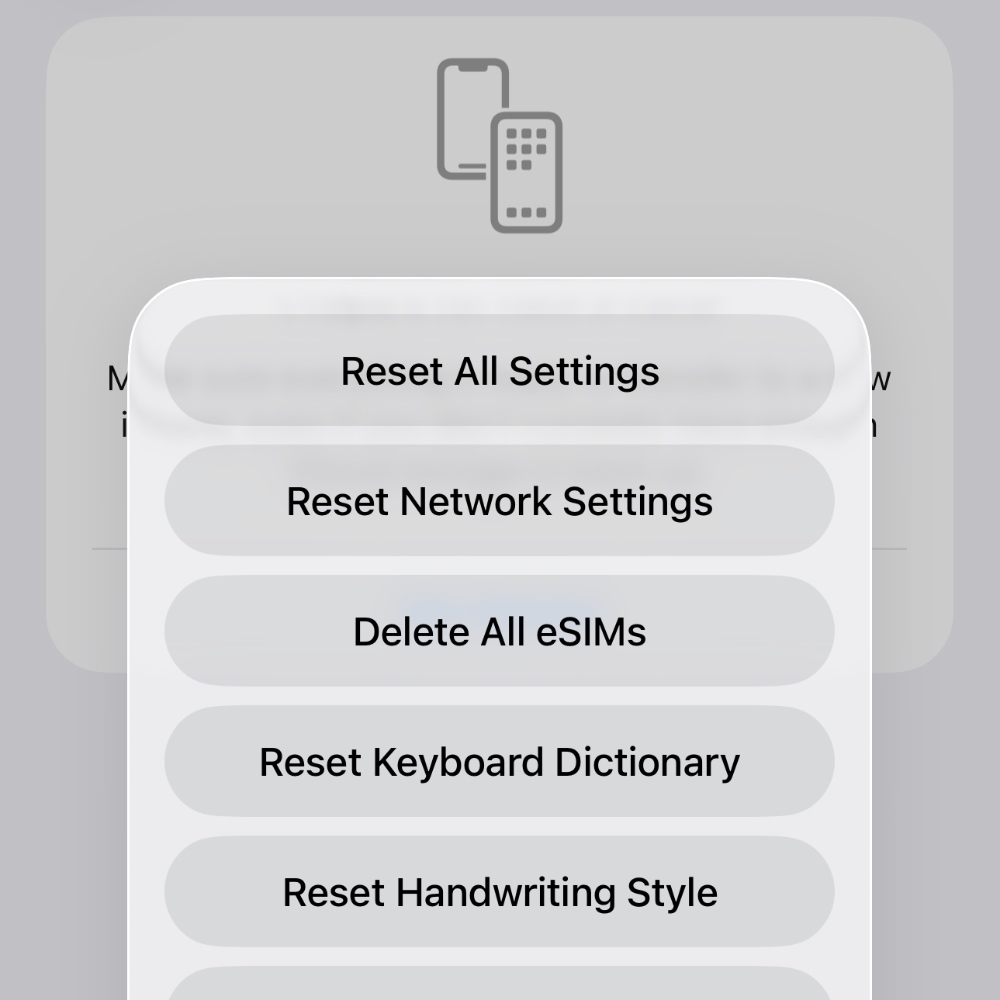
If your carrier requires manual APN settings, you might need them at this point. Also, you have to reconnect to all your Wi-Fi networks again, so make sure you have your passwords with you.
Issue still persists? There’s nothing else to do than wait for a new iOS 26 or iPadOS 26 update to arrive in order to fix things up.




