

If there’s a power failure, your iMac, Mac Studio, Mac Pro, and Mac mini can turn back on automatically. Here’s how it works.
You can Set Your Mac to Start up Automatically After a Power Failure, Ensuring Everything is up and Ready
There are a ton of users who do not power off their Mac. If you’re one of them, then you already know how annoying it is to turn it back on after a power failure.
On a MacBook Air or MacBook Pro, this isn’t an issue since these laptops have built-in batteries to keep them going.
Apple’s desktop Mac, that relies solely on mains electricity, does not turn back on by default if there’s a power failure. You have to turn it back on yourself.
It’s a great measure to protect your Mac, but it can get in the way if you are running something in the background that requires constant power.
Thankfully, you can set your Mac to power on immediately after a power failure. The moment electricity is back, your Mac will boot right up.
Here’s how it works:
Step 1. Launch System Settings on your Mac.
Step 2. Click on Energy from the list of options on the left.
Step 3. Right at the bottom you’ll see an option for ‘Start up automatically after a power failure.’ Once enabled, your Mac will power back up as soon as electricity is restored.
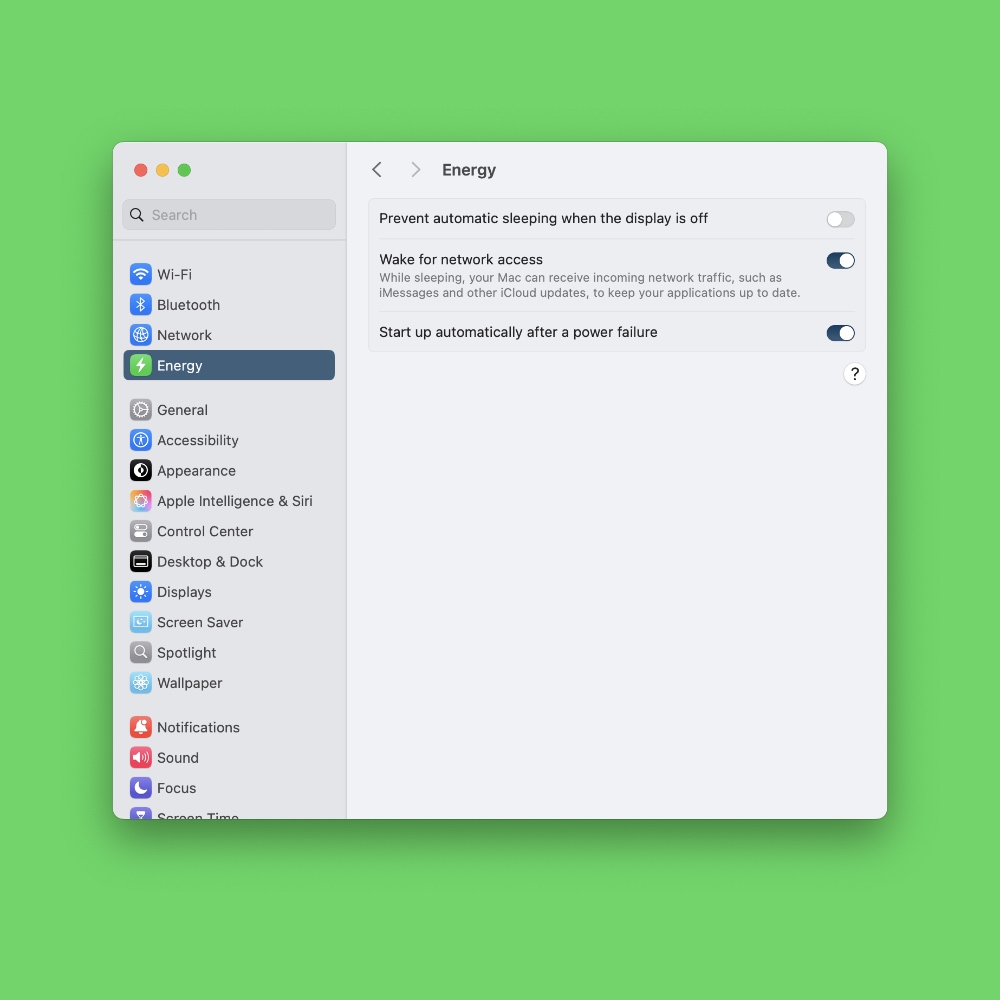
Though this feature is definitely useful for a lot of users out there, I will keep it at its default setting.
The thing is, you never know what’s going on with the grid. If there’s a surge in power when electricity is restored, it can damage your Mac. But if you trust your grid well enough, then you may want to enable this feature.
While we are on the topic of keeping your Mac powered on, be sure to give the Caffeinate command a look too. Once enabled, it will keep your Mac awake indefinitely.