
There is a toggle switch in Settings on your iPhone which may improve the quality of your photos taken using Camera app.
‘Prioritize Faster Shooting’ is Designed to Make Your iPhone More Responsive When Taking Photos, but a Cost of Lower Quality Images
Before I go any further, let me assure you that I have done my proper research on this and many of you may not notice the improvement at all.
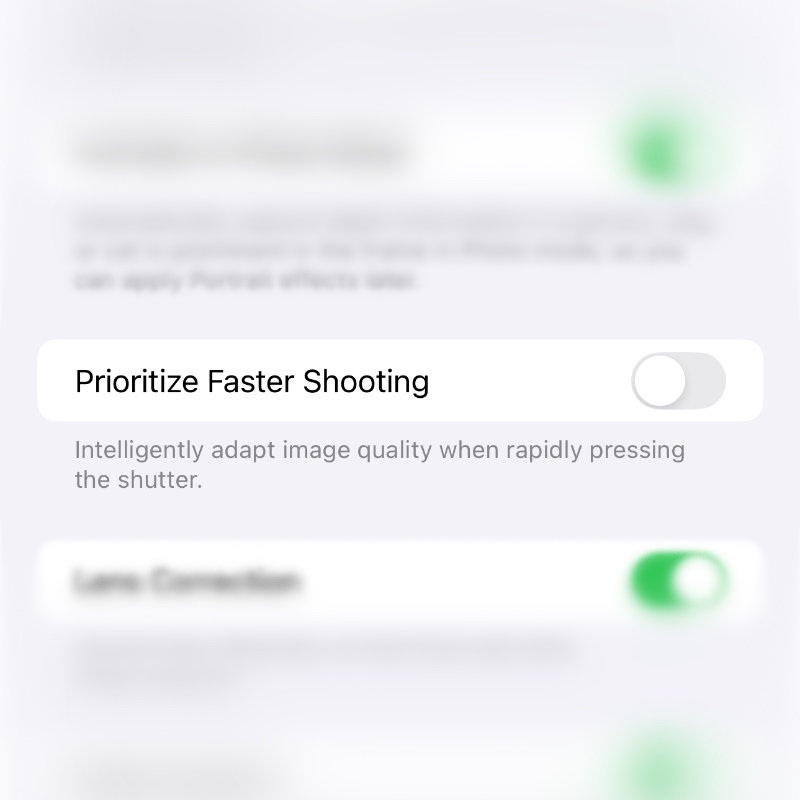
Here’s how you disable that toggle switch, and then I’ll talk about what it does:
Step 1. Launch the Settings app.
Step 2. Find Camera and open it.
Step 3. Find the toggle switch called Prioritize Faster Shooting and disable it.
Now comes the part where I talk about this feature a little.
With the feature enabled, your iPhone will slightly decrease the quality of the images saved after taking them using the Camera app. This only happens if you are rapidly pressing the shutter button to take a lot of photos.
If you turn this feature off, you’ll notice that your iPhone takes a while to save the next photo before you can press the shutter button to take the next one. In other words, the shutter button feels slow to respond. It’s because your iPhone is doing extra work to save images at the highest quality.
Are you an iPhone photographer that prioritizes quality above anything else? Then turn the toggle switch off. But I assure you one thing, if you are taking photos in the laziest possible manner, one shutter click at a time, you will not notice a change in quality at all.
Some people even say turning off this switch makes regular photos look better too. I’m not going to comment on that at all, and I’ll leave that up to you to decide.