

Here’s how you can fine-tune and customize the Instagram algorithm on iPhone or iPad, and see posts that are of more interest to you.
See Your Interests on Instagram and Fine-Tune the Algorithm to Your Liking Using Your iPhone or iPad
I live by a simple rule when it comes to discovering new stuff: let’s see where the algorithm takes me. Sometimes it works, sometimes it does not.
However, if you have very specific interests and don’t want Instagram to sway away from them, then you will be pleased to learn that you can actually fine-tune and customize the algorithm to your liking.
All you need is your iPhone or iPad in order to customize the algorithm, and it only takes a couple of minutes too. Here’s what you have to do:
Step 1. Launch the Instagram app.
Step 2. Tap on the Explore page icon at the bottom. The one that looks like a magnifying glass.
Step 3. From here, open up any video.
Step 4. At the top right you’ll see an icon that looks like a couple of sliders with hearts. Tap on it to open.

Step 5. You are now in the ‘Your algorithm’ section of Instagram.
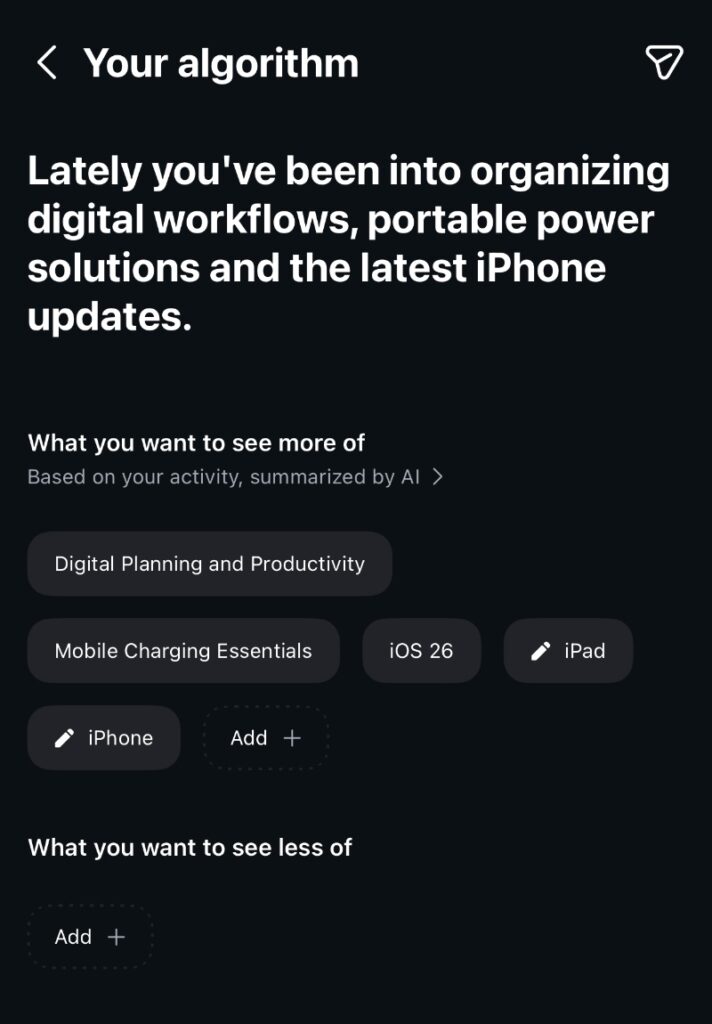
There are two sections here. One says ‘What you want to see more of’ and ‘What you want to see less of.’ Populate each of them using keywords that define your interests and non-interests best.
For example, if you are not interested in seeing anything related to the MacBook Pro, then tap on ‘Add’ under the ‘What you want to see less of’ and type in ‘MacBook Pro.’ You can keep adding as many things as you like.
And of course, you can add as many keywords as you like to the ‘What you want to see more of’ section. Tap on ‘Add’ and type away all your interests.
It’s really that simple. And you can keep on customizing the algorithm however you please down the line too, ensuring you see posts that are of interest to you, nothing else.
Do keep one thing in mind: adjusting how the algorithm works is a never-ending process. Interests will come and go over time, and the AI behind it will try to get a good grip on what you like and what you don’t constantly. Sometimes it may not get things right, and that’s why customizing the algorithm manually is important.