


The full and final version of the watchOS 26.2 update is now available for download on Apple Watch, and here’s everything that is new.
Apple Releases Final Version of the watchOS 26.2 Update for Apple Watch, Download it Today with New Features
The watchOS 26.2 RC update has been around since last week. If you managed to update your Apple Watch at the time of its release, then this day might not bring that much excitement to you.
If you’re installing the watchOS 26.2 update for the first time, let’s first check out everything new that is bundled with this update:
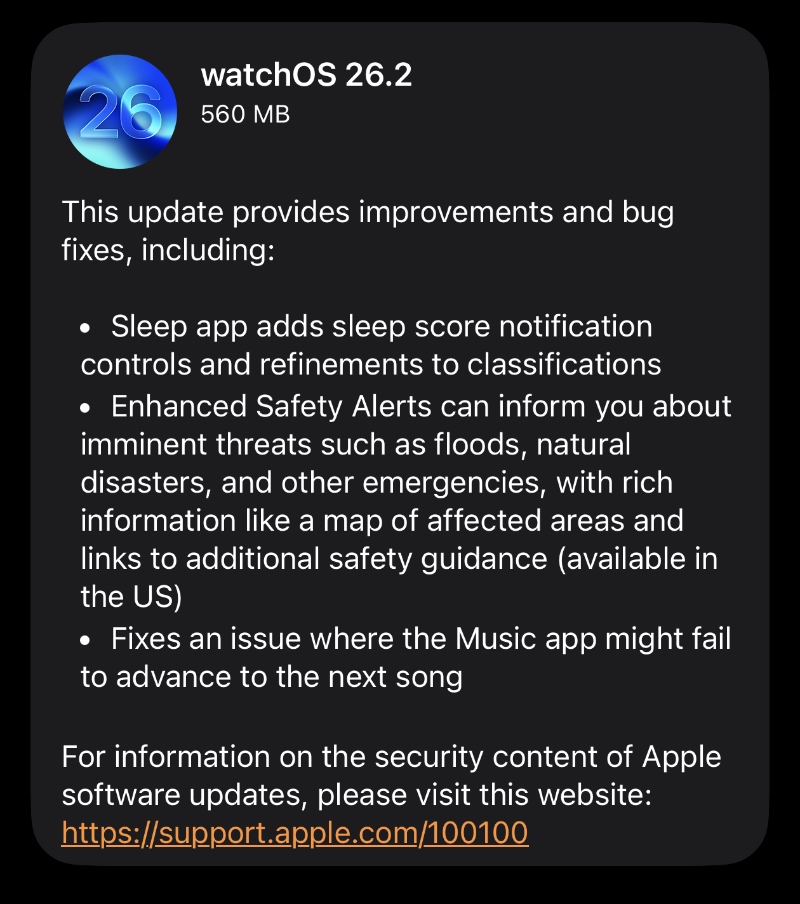
That might not seem like much, but if you want your Apple Watch running as smooth as possible then you do need to download watchOS 26.2 right now. And it only takes a few taps and swipes too. Here’s what you have to do:
- Place your Apple Watch on its magnetic charger.
- Make sure your iPhone and Apple Watch are both connected to Wi-Fi.
- Launch the Watch app on your iPhone.
- Open General, and then open Software Update.
- Once Software Update is done refreshing, you’ll see the watchOS 26.2 update.
- Tap on Download and Install.
Apple Watch updates take almost forever to install, which is a completely normal thing.
The new watchOS 26.2 update has the following build number: 23S303
There’s no way to clean install the watchOS 26 update on Apple Watch. However, you can perform a factory reset and set up your Apple Watch as new after installing watchOS 26.2, and that has the same effect as a clean installation.
You can do this by launching the Watch app on iPhone, then tap on All Watches at the top left, then tap on the (i) button next to your current Apple Watch, and then select Unpair Apple Watch.




