Here’s a step-by-step tutorial on how to see the most viewed Reels of a content creator account on Instagram using your iPhone and iPad.
Check Out an Account or Content Creator’s Most Viewed Reels on Instagram Using Your iPhone and iPad
Once you’re hooked to a content creator on Instagram, the first thing you do is binge-watch their Reels by scrolling endlessly on their timeline, exactly how it should be.
Not all content creators make great Reels though, and it’s just a better idea to see their most popular and most viewed content and make an exit once you’re done.
In today’s tutorial, I’m going to show you how to do just that – view an account’s most viewed Reels on Instagram.
Step 1. Launch Instagram on your iPhone or iPad.
Step 2. Open any account on Instagram that has posted Reels.
Step 3. Tap on the Reels tab on their profile.
Step 4. You’ll immediately see a tiny arrow facing downwards on the Reels tab. Tap on it, and then select ‘Most viewed.’ By default, it’s set to show you the latest Reels first.
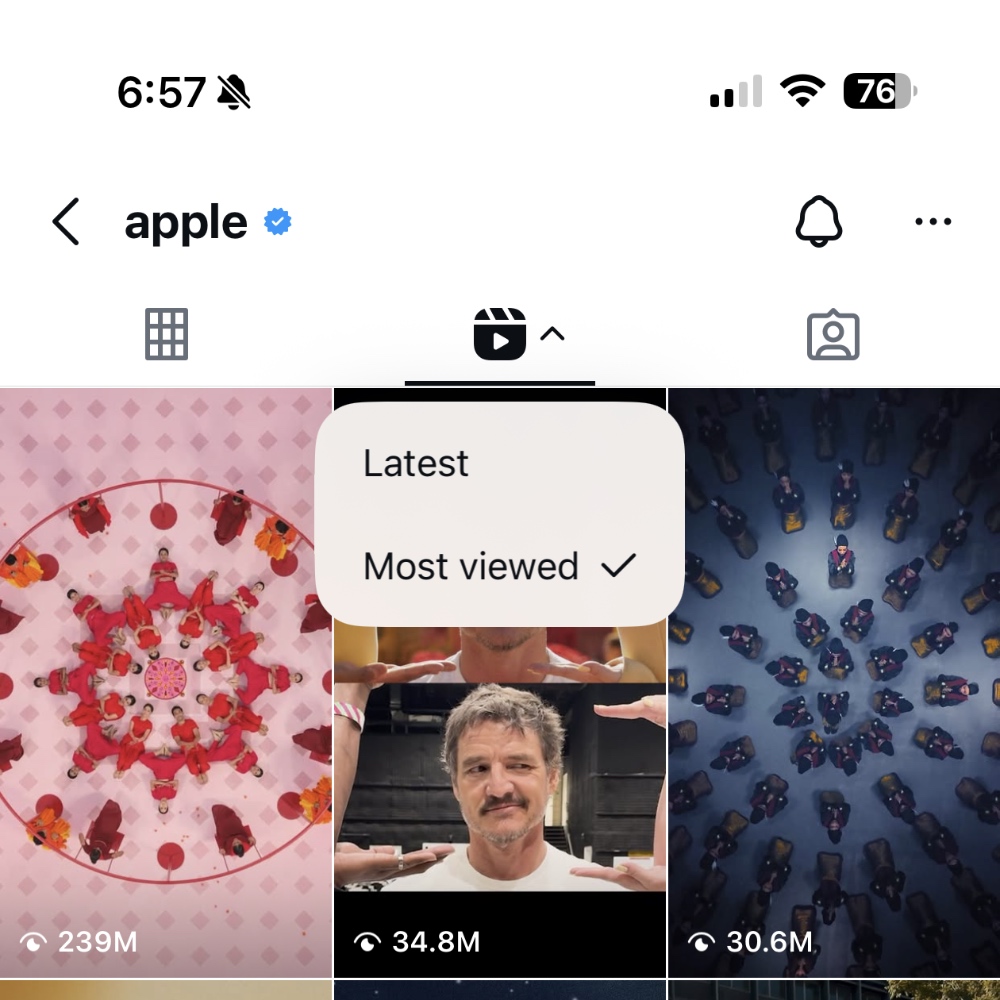
The moment you do this, Reels with the most views will appear first. It’s actually a great little feature too, and may help you get to the best content first, making your break time on Instagram that much enjoyable compared to regular viewing.
In fact, you can use this feature to inspire yourself to create content as well. Just select the ‘Most viewed’ option, and it will tell you what sort of content does best on Instagram, and it may just inspire you to step up your game for the better.
For me, this feature lends me an immediate dose of entertainment, especially when I’m going through the account of a comedian. Don’t believe me? Try it right now.