

You can now publish posts on Threads that disappear after 24 hours, and I will show you how to use it on your iPhone.
Threads Introduces ‘Ghost Posts’ that Disappear After 24 Hours Automatically, Here’s How You Can Use it
Threads is slowly and gradually gaining a lot of useful features, and you don’t have to pay extra money for them either.
Today, the Meta-owned social network is rolling out ghost posts that disappear 24 hours after they’ve been published.
Think of it as a fun little feature that allows you to share your thoughts or hot takes, and have them deleted automatically once the 24-hour time frame is up.
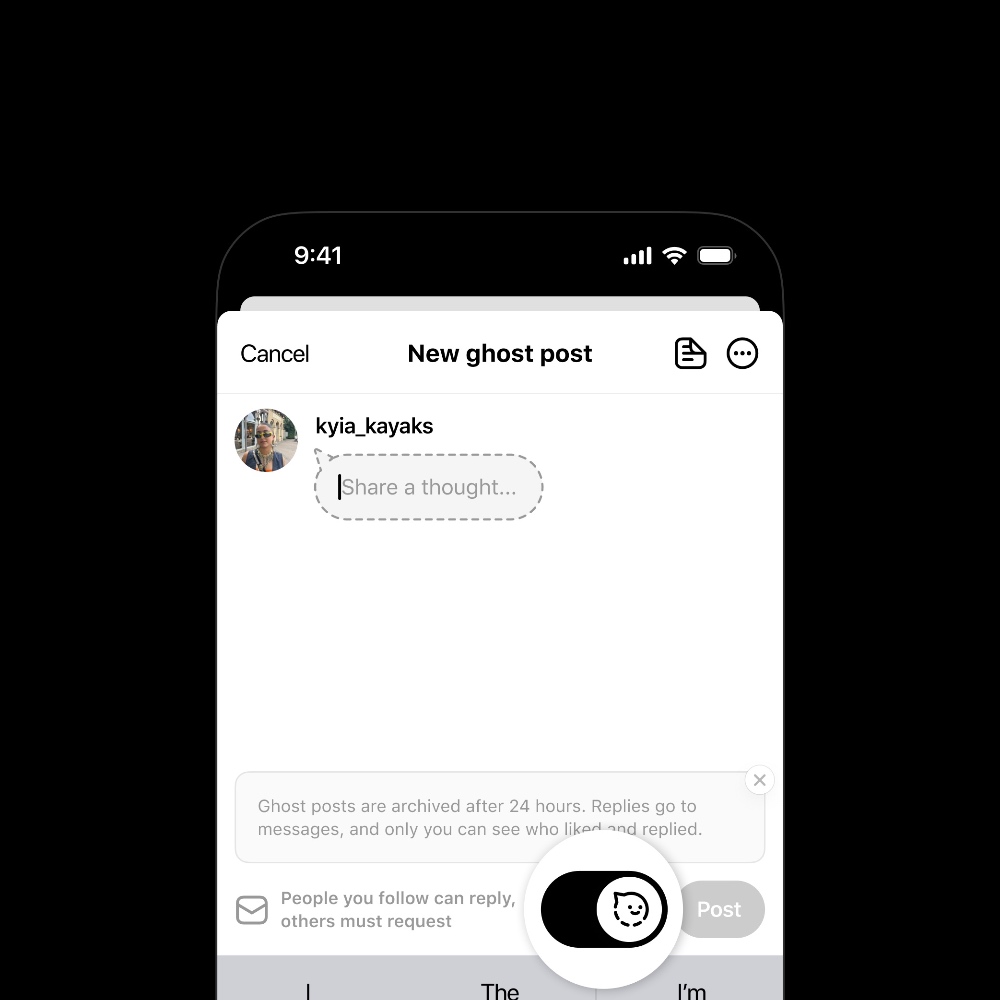
Ghost posts stand out from regular posts as they look like little speech bubbles, so you instantly know the post will disappear soon.
If someone likes your ghost post, only you are able to see who has liked it and it will remain private for everyone else.
Last but not least, whenever someone replies to a ghost post, it will appear straight in your DMs. Again, a bit of privacy in mind when it costs to ghost posts.
Creating a ghost post is simple, and you can follow these steps in order to do that:
Step 1. Launch the Threads app on your iPhone.
Step 2. Tap on the + button to create a new post.
Step 3. Enable the ghost post icon as shown below, type away your message, and then tap on Post.
At the time of writing, all I see are ghost posts on my timeline, which is understandable, because people have been waiting for this feature to arrive.
But is it actually useful or fun? Because it builds around private conversations only, and may not be that much fun when someone wants to go overboard with the hottest take on the planet.