


Is the Do Not Disturb Focus not syncing across your iPhone, iPad, and Mac devices? There’s a fix for it, and it’s not complicated at all.
You Can Easily Fix the Do Not Disturb Syncing Issue in Under a Minute on iPhone, iPad, and Mac
This issue happened to me a couple of days ago, and I decided to write a fix for it so that everyone can benefit from it.
What Happened?
By default, when you turn on Do Not Disturb on your Apple device, it is automatically synced across your iPhone, iPad, and Mac. If it doesn’t, then there’s definitely an issue.
A couple of days back, I realized that my iPad would refuse to go into Do Not Disturb mode whenever I toggled it using my iPhone or iPad. I even tried restarting all my devices but nothing happened.
Clearly, the issue was with the iPad itself, nothing else.
How Did I Fix it?
It was actually very easy. And these are the steps that I followed on the iPad on which I was having the issue:
Step 1. Launch Settings.
Step 2. Tap on Focus.
Step 3. You’ll see a toggle switch here called Share Across Devices. Simply turn it off, then back on again.
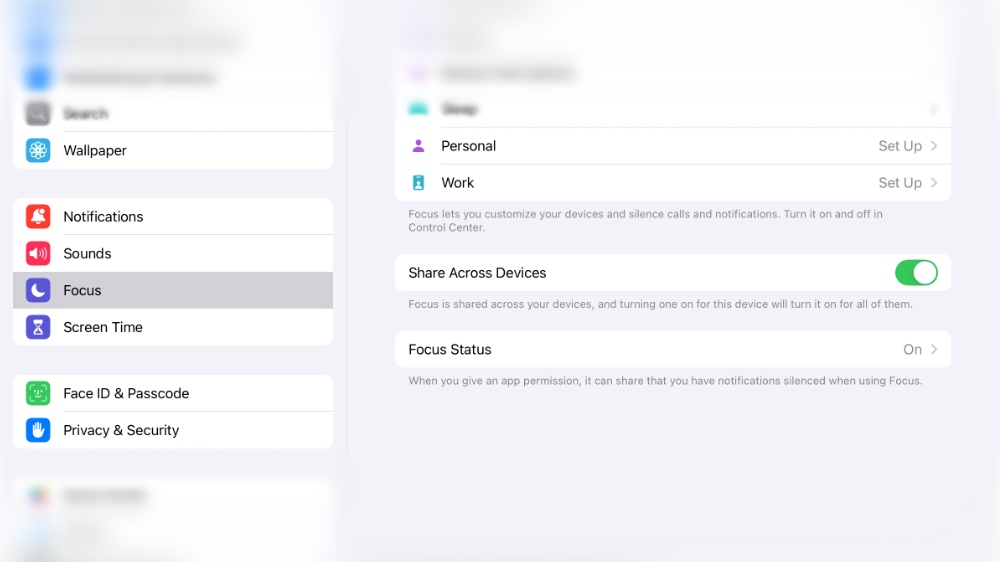
You can follow the exact same steps on your iPhone and Mac if those are the devices that are facing the syncing issue.
The switch needs to stay on at all times if you want your Focus modes to sync across all your iPhone, iPad, and Mac devices.




