


Apple has just released the first beta of macOS 26.1 Tahoe for developers, and you can download it on the Mac today.
macOS 26.1 Tahoe Developer Beta 1 is Now Available for Download with New Features and Changes for the Mac
With the successful launch of macOS 26.0 last week, Apple is ready to take things to the next level with the introduction of macOS 26.1 Tahoe for developers.
The new beta is available to download over the air for developers only, and if you’re already signed up as one, you can immediately install the update and start testing it out.
You need to be signed up to the Apple Developer Program. Once that is out of the way, just launch System Settings, then go to General > Software Update, and then Beta Updates.
From the drop-down menu, select macOS Tahoe 26 Developer Beta, and you will immediately see macOS 26.1 available for download.
Click on Update Now next to it, and the download will begin instantly.
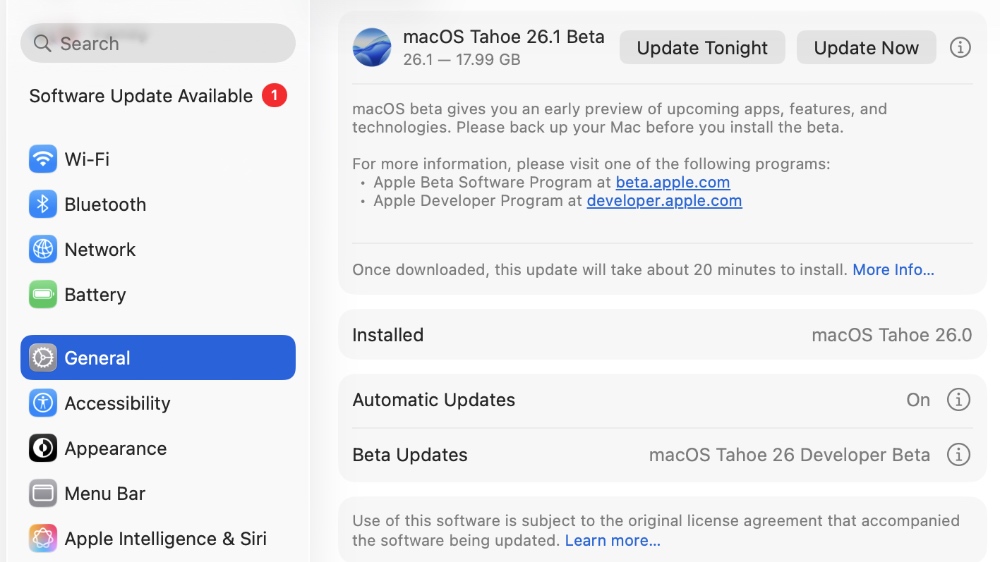
According to Apple, the new macOS 26.1 developer beta 1 has the following build number: 25B5042k
Initial reports suggest that Apple is bringing new languages to Apple Intelligence with this update. But if there’s anything else that is noteworthy, I will definitely highlight it.
Testing out the first developer beta of any software is always going to be risky. If you’re up to it, you can go ahead and install it, but I will advise against it.
Just wait for the first public beta to arrive instead, and it should be available when the third developer beta of macOS 26.1 comes out. Even then, there are risks involved with beta software, such as random app crashes and maybe even worse battery life on something like a MacBook Air or MacBook Pro.
Also keep in mind that downgrading from macOS 26.1 to macOS 26.0 isn’t going to be an easy task as well. Sure, it is possible using Internet Recovery, but you will lose all your files and settings, meaning you’ll be starting from scratch.
That is too much trouble to go through if the beta does not work out for you at all. So, stay away from it for the time being.




