


iOS 26.0.1 and iPadOS 26.0.1 are now available for download for iPhone and iPad with loads of bug fixes and other improvements.
iOS 26.0.1 and iPadOS 26.0.1 Now Available for Download on iPhone and iPad with Loads of Bug Fixes
As expected, Apple has released iOS 26.0.1 and iPadOS 26.0.1 updates for iPhone and iPad. It comes with a bunch of bug fixes and even patches an issues for iPhone 17 users where Apple Intelligence may become unusable.
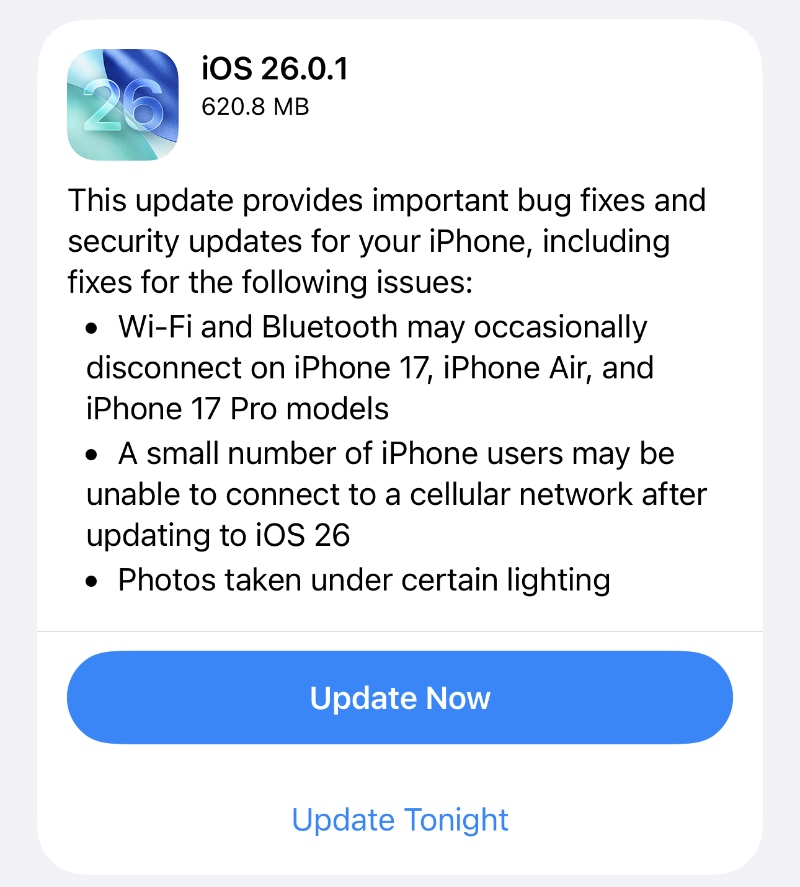
In order to download this update right now, all you have to do is launch the Settings app, go to General > Software Update. When you see the new iOS 26.0.1 or iPadOS 26.0.1 update, tap on Update Now beneath it.
According to Apple, the new iOS 26.0.1 and iPadOS 26.0.1 have the following build number: 23A355
The update will start downloading instantly if you have 50% or more battery life remaining. I will suggest connecting your iPhone or iPad to a power outlet anyway to ensure quick installation of the update.
If you’re looking for the official iOS 26.0.1 or iPadOS 26.0.1 IPSW files, you’ll find them below:
- iPhone Air
- iPhone 17
- iPhone 17 Pro Max
- iPhone 17 Pro
- iPhone 16e
- iPhone 16 Plus
- iPhone 16
- iPhone 16 Pro Max
- iPhone 16 Pro
- iPhone 15 Pro Max
- iPhone 15 Pro
- iPhone 15 Plus
- iPhone 15
- iPhone 14 Pro Max
- iPhone 14 Pro
- iPhone 14 Plus
- iPhone 14
- iPhone SE (3rd-generation)
- iPhone 13
- iPhone 13 mini
- iPhone 13 Pro Max
- iPhone 13 Pro
- iPhone 12 Pro Max
- iPhone 12, iPhone 12 Pro
- iPhone 12 mini
- iPhone SE (2nd-generation)
- iPhone 11 Pro, iPhone 11 Pro Max
- iPhone 11
- iPad mini 7 with A17 Pro
- iPad Pro 11-inch (M4), iPad Pro 13-inch (M4)
- iPad (A16)
- iPad Air 11-inch (M3)
- iPad Air 11-inch (M2), iPad Air 13-inch (M2)
- 11-inch iPad Pro (4th-generation), 12.9-inch iPad Pro (6th-generation)
- iPad Air (5th-generation)
- 10.2-in. iPad (10th generation)
- 11-inch iPad Pro (3rd-generation), 12.9-inch iPad Pro (5th-generation)
- iPad mini (6th-generation)
- 10.2-inch iPad (9th-generation)
- iPad Air (4th-generation)
- 10.2-inch iPad (8th-generation)
- iPad mini (5th-generation), iPad Air (3rd-generation)
- 11-inch iPad Pro (1st and 2nd generations), 12.9-inch iPad Pro (3rd and 4th generations)
Looking for the quickest and easiest way to clean install the new firmware update? Check out the tutorial posted here.
Do keep one thing in mind: while this update will fix a bunch of issues you might be facing on your iPhone and iPad, it will not take care of each and every single thing.
Fixing bugs is basically a never-ending process, and we will keep on seeing updates from time to time that will improve the stability of Apple’s software on iPhone and iPad.
Alongside today’s update, the iOS 26.1 and iPadOS 26.1 updates are available for developers and public beta testers as well.




