


Wi-Fi randomly dropping out or disconnecting on your iPhone or cellular iPad? There’s a simple fix for it.
iPhone or Cellular iPad Disconnecting from Wi-Fi Abruptly When You Move Away from the Router? You Can Fix it
Ever noticed how Wi-Fi on your iPhone or cellular iPad completely disconnects or drops out when you walk into a room, or even when you lose just one bar of Wi-Fi? Don’t worry, you’re not alone.
Sure, you can go ahead and upgrade to a mesh Wi-Fi system in order to fix the issue, but there’s a chance you don’t have to do that.
The thing is, your iPhone and cellular iPad have a built-in feature where it switches over to cellular data (5G or 4G LTE) whenever it thinks Wi-Fi signal strength is low.
That’s a handy feature, without a doubt, since it keeps you online at all times. But the problem is, it gives you the illusion that your Wi-Fi router has signal strength issues when it clearly does not.
So, what’s the fix to all of this? Turn off a feature called Wi-Fi Assist. Here’s what you have to do:
Step 1. Launch the Settings app.
Step 2. Tap on Cellular, or Mobile Data, depending on the region of your iPhone and iPad.
Step 3. Scroll down and find the Wi-Fi Assist toggle switch and turn it off.
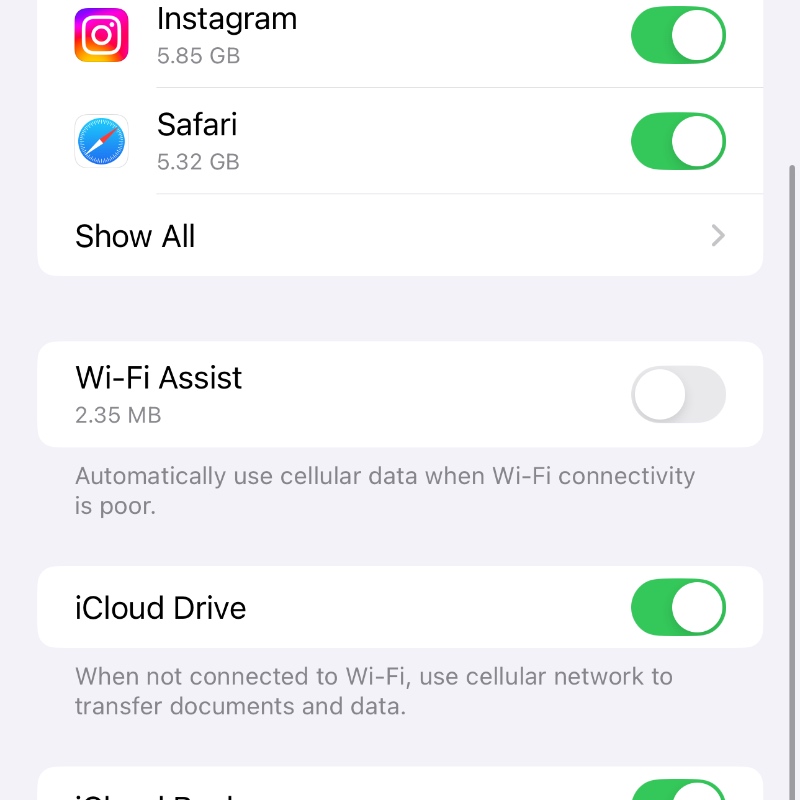
From now on, whenever Wi-Fi signal strength is low, your iPhone and iPad will stay connected and won’t switch over to cellular data.
Have a dual-band Wi-Fi router at home? Your iPhone and iPad should switch over to the 2.4GHz band when you’re far away from the Wi-Fi router, rather than just switch over to cellular.
If there’s a corner of your house that constantly sees Wi-Fi disconnections for no reason at all, turning off this feature will do wonders for you.
Turning off Wi-Fi Assist didn’t do anything at all? Then you might want to consider upgrading your router at home. There are plenty of great ones to choose from these and all of them offer excellent range.




