



Is your Apple Pencil constantly disconnecting from your iPad, iPad Air, iPad Pro, and iPad mini? Here’s how to fix this issue.
Get that Apple Pencil Back into Business and Fix all Disconnection Issues on iPad, iPad Air, iPad Pro, and iPad mini
There’s nothing more annoying than an accessory that refuses to stay connected to your device. In this case, that accessory is the Apple Pencil, and the device is your iPad.
If you’ve been experiencing an issue with Apple Pencil where it randomly disconnects from your iPad, iPad Air, iPad Pro, or iPad mini, there are a couple of things you should do before taking your Pencil to Apple.
The first fix requires a bit of patience and works for a ton of people out there, including myself. Here’s what you have to do:
Step 1. Detach your Apple Pencil from your iPad.
Step 2. Open Settings, tap on Bluetooth.
Step 3. Find your Apple Pencil, tap on (i) next to it, and then select Forget This Device.
Step 4. Now go to Settings > Bluetooth and turn off Bluetooth.
Important: Don’t do this from the Control Center. Make sure you turn off Bluetooth from Settings, nowhere else.
Step 5. Restart your iPad, iPad Air, or iPad Pro. You can do that following these steps:
- Press Volume Up button and let go.
- Press Volume Down button and let go.
- Press and hold the Power button until the screen turns off and you see the Apple logo.
- Let the Power button go on the Apple logo.
Step 6. When your iPad boots up, go to Settings > Bluetooth and turn on Bluetooth.
Step 7. Now attach your Apple Pencil to your iPad and set it up as you normally would.
There is one more thing you have to make sure about.
Launch the Settings app, go to Privacy & Security > Location Services > System Services, and make sure the Networking & Wireless switch is turned on.
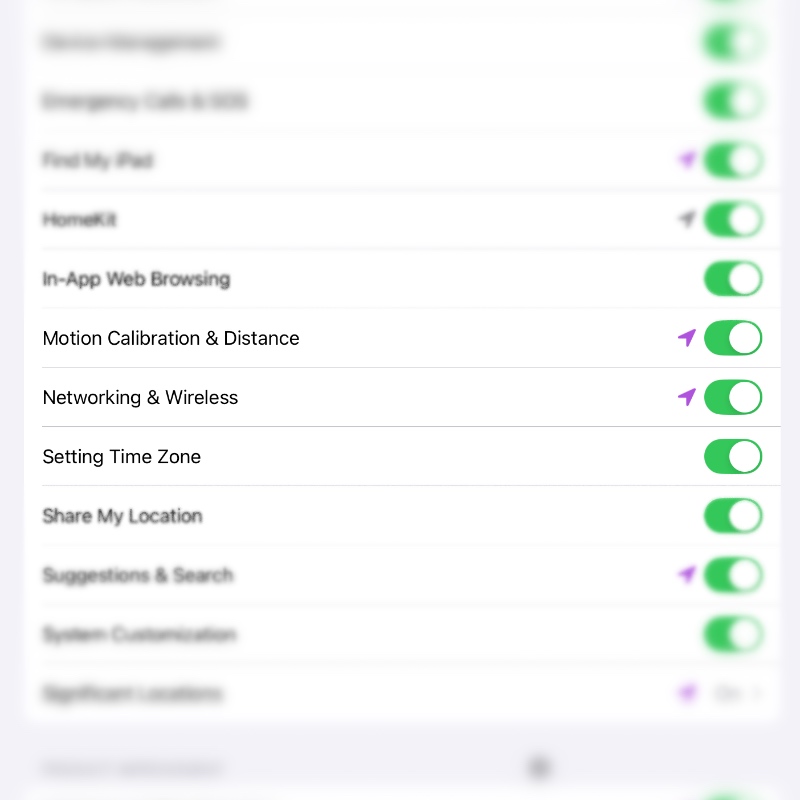
Do keep in mind that Apple Pencil relies on Bluetooth for connectivity to your iPad. If there is nearby interference on the 2.4GHz band, it can cause issues. With the Networking & Wireless switch turned on, your iPad ensures that your Apple Pencil stays on a clean channel and stays connected.
If your Apple Pencil still disconnects, then you might want to take your iPad and Apple Pencil both to Apple.




