


Are your HomeKit devices such as smart sensors, cameras, and doorbells frequently disconnecting? Your Wi-Fi might be the culprit.
A Feature Called Airtime Fairness Causes Wi-Fi Connectivity Issues on Some HomeKit Smart Devices, Disable it Now
We tend to blame poor wireless quality or frequent disconnections on our smart home devices, and that’s mostly far from the truth.
See, for optimal Wi-Fi performance, you really do need to be close to your Wi-Fi router, or just fix weak signals by investing in something like a mesh system.
However, sometimes disconnections and poor signal quality don’t make sense at all. If you’re facing the same issue, then it’s highly likely that one feature in your Wi-Fi router is causing all these problems.
The Culprit is Airtime Fairness
That feature is called ‘Airtime Fairness.’ Once enabled, it prioritizes faster devices so that your entire network is not bogged down by slower ones.
So, if there’s a very, very slow device on your network, such as a smart sensor that occasionally transmits data, it will struggle to stay connected and may even lose connection to your network completely.
The issue gets worse if your device is far away from the Wi-Fi router.
Turn Off Airtime Fairness
It’s best to head over to your Wi-Fi router’s setting page and turn Airtime Fairness off. You may want to head over to your router manufacturer’s website and see where this feature is and how to disable it.
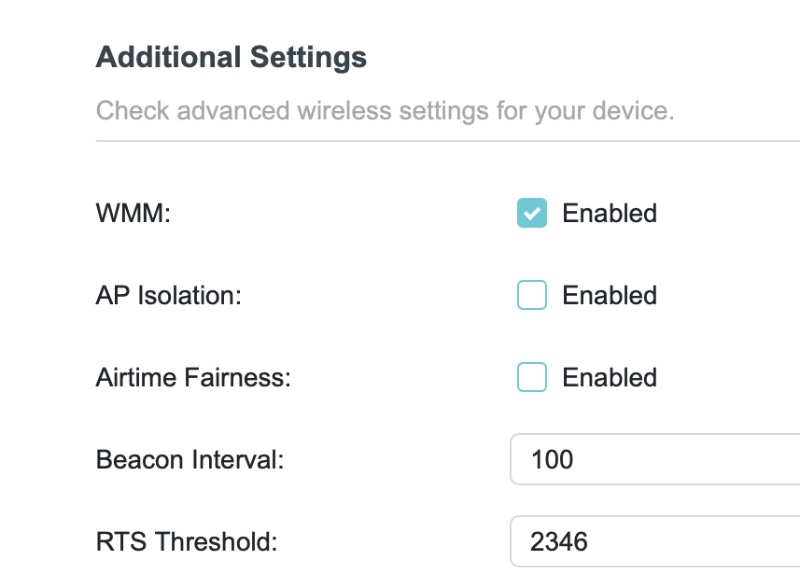
In fact, this will improve performance of your HomeKit security cameras by a huge margin, especially if it’s sitting in some far and obscure corner of your house.
While Airtime Fairness is designed to make your network efficient, but it does show its shortcomings in certain corners, especially when it comes to smart home devices, or in this case, HomeKit stuff.
Other Things Worth Checking Out
You can also check which channel width you’re using on your Wi-Fi network. It’s best to set the 2.4GHz band to 20MHz and the 5GHz band to 80MHz.
While the 160MHz channel width seems like a great thing to have around, if you live near the airport or a radar system, it will bring your entire network down.
Using a narrower width ensures you experience the least amount of interference from nearby devices over Wi-Fi. It especially comes in handy if you’re living in an apartment setting and there are a ton of Wi-Fi routers nearby.




