



Dialogue too quiet in Apple TV app for iPhone or iPad? Try the built-in ‘Enhance Dialogue’ feature to boost volume and clarity.
Apple TV App on iPhone and iPad has a Built-in Enhance Dialogue Feature that Boosts Volume and Clarity
Whether you’re watching a movie, TV show, or anything from TV+ on iPhone and iPad, there’s nothing more annoying than low dialogue volume.
Thankfully, there’s an official feature in the Apple TV app that allows you to boost the dialogue volume. It actually works wonders, especially if you forgot your headphones and want to listen in what the characters have to say without boosting the overall volume.
This is what you need to do in order to enable this feature:
Step 1. Launch the Apple TV app on your iPhone or iPad.
Step 2. Play any movie or TV show of your choice.
Step 3. Right next to the ‘subtitles’ button is the Enhance Dialogue button. Tap on it.
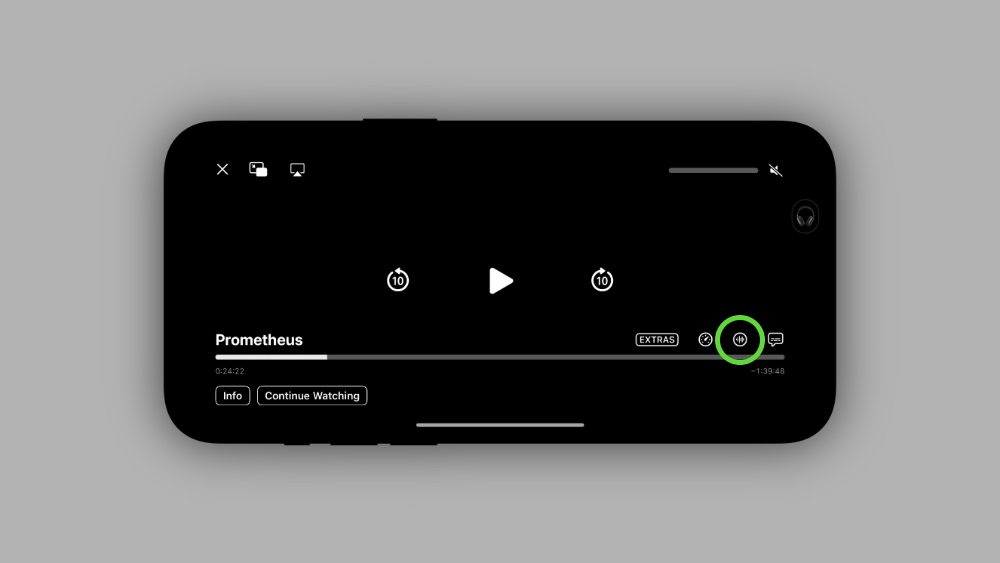
Step 4. You’ll see two options here – Enhance and Enhance More. Try both and see which one suits you more.

You’ll instantly notice the difference, especially if you’re wearing headphones. The character voice cuts through everything else and is super clear all of a sudden.
Do keep in mind that this feature works in iOS 18 and iPadOS 18 only. If you are running an older version of Apple’s software, then you can’t use this feature at all.




