


Here’s how you can download and install the iOS 18.5 and iPadOS 18.5 RC right now on your compatible iPhone and iPad devices.
iOS 18.5 and iPadOS 18.5 RC Released with Bug Fixes and Other Improvements, Download and Install it Now
Apple has just released RC (release candidate) updates of iOS 18.5 and iPadOS 18.5. If you already have a previous beta installed on your device, all you have to do is go to Settings > General > Software Update and then tap on Update Now.
However, if you don’t have the beta installed, nor you’re testing it out, the final version will become available for you some time next week.
But don’t worry, you can still download the RC build right now on your device and all it takes is a couple of minutes. Here’s what you have to do:
Step 1. Launch Safari and go to the following URL: beta.apple.com
Step 2. Once the page opens up you’ll find the Sign In button at the top. Sign in using your current Apple Account.
Step 3. Once signed up, go to Settings > General > Software Update > Beta Updates on your iPhone or iPad.
Step 4. Tap on iOS 18/iPadOS 18 Public Beta.
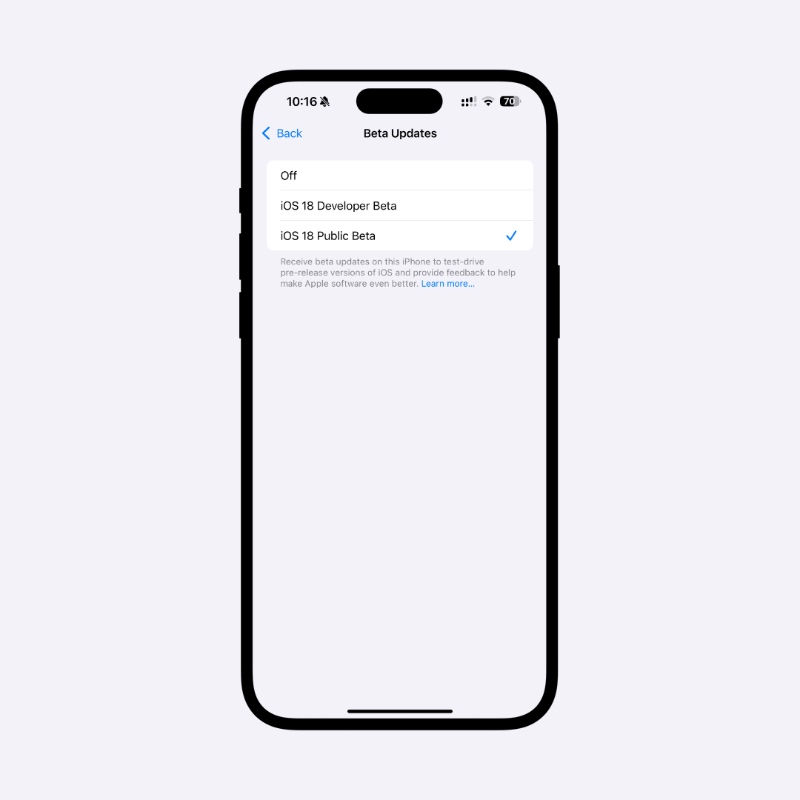
Step 5. Tap on Back at the top left hand corner and you’ll see the RC show up in few seconds. Tap on Update Now to download and install it.
iOS 18.5 and iPadOS 18.5 are packed with bug fixes and security updates. Other than that, the updates include the brand-new Pride Harmony wallpapers, which look absolutely stunning.
Although the RC is available for download right now, I will recommend waiting till next week and installing the final version directly instead. After all, you’ve waited this long, why not hold back a few more days too?




